August 28th, 2025
The Waterloo Region District School Board is committed to keeping your children safe. To comply with privacy legislation we have changed the way we communicate elementary students’ home classrooms for September. Class lists will no longer be posted on the outside windows or doors of your child’s school.
If you are a parent or caregiver using School-Day (https://www.school-day.com/), you will be able to view classroom information starting September 2.
If you do not use School-Day, class lists will be available inside the school on the first day of classes. Teachers will also have the class lists available on the morning of the first day of school to help determine the location of your child’s classroom.
How to check your child’s class assignment
- Log into School-Day (http://www.school-day.com/) and click on the “All Students” drop-down box, to show your child’s name. If you have not signed up for School-Day instructions are available on our website. (https://schools.wrdsb.ca/school-year-information/action-required/using-school-day/)

- Once you have selected your child’s name, click “Schools and Groups” in the blue left-hand menu, then select “Your Classes” from the pop-out menu.
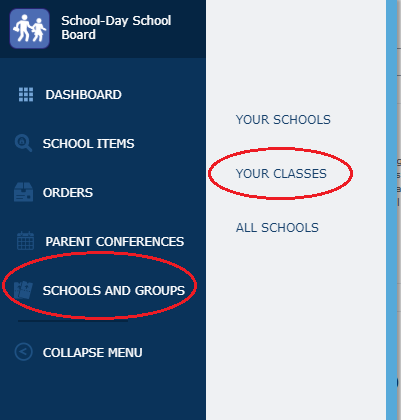
- You will now be able to see the homeroom classroom that your child has been placed in. Individual schools will be sending out further information about the teachers for each classroom.
If you have any questions about the management of student personal information at the WRDSB, please contact our Freedom of Information, Privacy and Records Information Management Officer, Waterloo Region District School Board. (records@wrdsb.ca)
If you have any questions about your child’s classroom and teacher, please contact your child’s school.
FAQ
How do schools develop class lists?
As we look to the new year, we want to share how thoughtfully and carefully our staff approach the creation of class lists. We consider each students’ academic needs, and social dynamics and always strive to have students placed with at least one friend. These are the guiding principles in forming our combined grade classes as well. Now that class lists are finalized, changes will not be made unless directed by the Board due to unexpected enrollment shifts. Moving even one student can create a domino effect, impacting friendships, classroom balance, and other placements. We recognize that change can be difficult but children are incredibly resilient and adapt quickly. Your support and encouragement help set a positive tone for your child’s transition and success. Please know that our staff are here to help every step of the way. Thank you for your understanding and continued support.
How do I sign up for a School-Day account?
Please refer to the School-Day Guide on our website for information on how to sign-up for your child’s School-Day account. Using School-Day does not cost parents anything.
How do I find my child’s class if I am not signed up on School-Day?
If you do not use School-Day, class lists will be available inside the school on the first day of classes. Teachers will also have the class lists available on the morning of the first day of school to help determine the location of your child’s classroom.
Why aren’t class lists posted on the outside windows or doors of your child’s school?
The Waterloo Region District School Board is committed to keeping your children safe. In order to comply with privacy legislation, we no longer post class lists on the outside windows or doors of your child’s school.
Can class list information change before the start of the school year?
Class lists may change up until the morning of Wednesday September 4, 2024 due to ongoing registrations.
What steps have been taken to address performance concerns with School-Day under extreme web traffic conditions?
School-Day has carried out a number of system maintenance updates in order to optimize system performance for all users system-wide.
If you require support while using the School-Day application, please contact them directly using one of the methods below.
- Visit the School-Day Support website
- Submit a ticket from within the School-Day Application with the question mark button in the top right corner
- Send a detailed outline of your problem to support.ticket@school-day.com
- Call the Support Desk at 1.855.253.1731 for 24/7 bilingual assistance